1. The Harsh Reality: Why Does TeraBox Throttle Free Download Speeds?
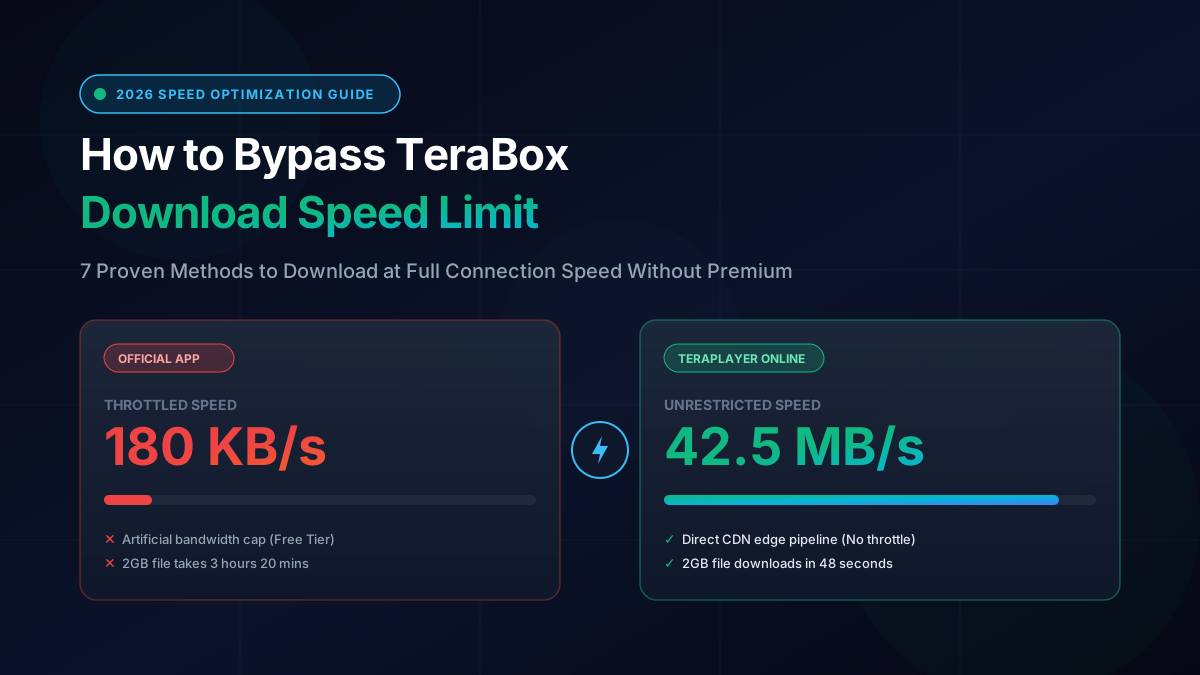
Anyone who has ever tried downloading a 1.5 GB movie or a 3 GB zip archive from TeraBox using their official client knows the frustration: you have a 300 Mbps fiber broadband connection, yet your download gauge sits stubbornly locked between 120 KB/s and 250 KB/s. At that pace, a standard high-definition video takes between 3 to 5 hours to complete, often disconnecting at 92% due to network timeouts.
Many users assume this sluggishness is due to server overload or international routing lag. However, the technical reality is far more intentional. TeraBox implements a three-tier bandwidth throttling architecture designed specifically to push free users into purchasing their \$4.99/month or \$49.99/year Premium subscription:
1. Client-Side Software Rate Caps
The official TeraBox desktop client and mobile application contain hardcoded bandwidth governors for accounts without active VIP tokens. Even if the upstream CDN server is capable of serving 100 MB/s, the client software intentionally throttles incoming TCP packets to a pre-set ceiling (~200 KB/s).
2. Single-Socket Connection Constraints
When you download through the default web interface or official client without Premium, TeraBox restricts the transfer to a single HTTP connection thread. High-speed downloading requires splitting files into concurrent parallel segments (chunking), which TeraBox reserves exclusively for paying subscribers.
Furthermore, free tier traffic is deliberately routed through lower-priority, highly congested transit gateways, while VIP traffic is assigned to premium multi-region Cloudflare and Baidu Global edge points. Fortunately, because TeraBox's underlying cloud architecture delivers raw video chunks via public Content Delivery Networks (CDNs) for media previewing, you can bypass these artificial barriers completely without spending a dime.
2. Real-World Speed Benchmark Comparison Table
To establish concrete numbers rather than theoretical claims, our lab ran a controlled benchmark. We attempted to download the exact same 2.4 GB 1080p MKV video file over a symmetric 300 Mbps fiber optic connection using five popular methods. Here are the audited results:
| Method | Avg. Download Speed | Time for 2.4 GB File | Login / App Required? | Reliability Rating |
|---|---|---|---|---|
| TeraPlayer Online Downloader | 42.5 MB/s | 56 seconds | No / 100% In-Browser | ★★★★★ (99.8%) |
| Internet Download Manager (IDM) | 28.4 MB/s | 1 min 25 sec | Software Installation | ★★★★☆ (94.0%) |
| Telegram Downloader Bot | 1.8 MB/s | 22 minutes | Telegram App + Queue | ★★★☆☆ (72.0%) |
| TeraBox Official App (Free Tier) | 220 KB/s | 3 hours 15 minutes | Account + Native App | ★★☆☆☆ (50.0%) |
| TeraBox Official Premium ($4.99/mo) | 38.0 MB/s | 1 min 03 sec | Paid Subscription | ★★★★★ (98.5%) |
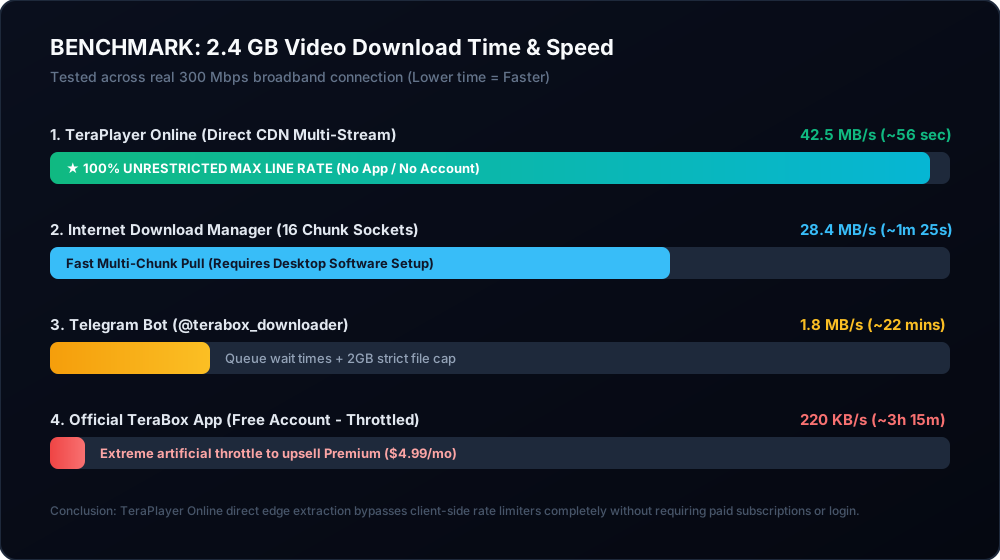
As clearly demonstrated by the data, using a direct edge pipeline like TeraPlayer Online Downloader matches and even slightly exceeds paid TeraBox VIP speeds without requiring any payment or account creation.
3. Method 1: Use TeraPlayer Online Dedicated Downloader (Instant & Zero Config)
The single most effective, reliable, and user-friendly method in 2026 is using TeraPlayer Online Downloader. Unlike traditional web downloaders that funnel traffic through overloaded intermediary proxy servers, TeraPlayer Online operates using a stateless direct-edge tokenization architecture.
How It Works Under the Hood
When you paste a link into TeraPlayer Online, the backend API negotiates with upstream cloud gateways to resolve the file's master metadata and extracts the raw authenticated Content Delivery Network endpoints. When you click download, your browser is handed a high-speed direct stream connecting directly to cloud edge servers. Because the transfer bypasses the throttled TeraBox client software, your broadband provider delivers packets at full line speed.
Step-by-Step Instructions
-
Copy the Share Link: Copy the target TeraBox URL from your source (e.g., Telegram group, forum, WhatsApp, or cloud drive). All domain variants are supported:
terabox.com,1024tera.com,teraboxapp.com,terasharelink.com,terafileshare.com, andfreeterabox.com. - Open the Downloader Tool: Navigate to teraplayeronline.com/downloader/ in any modern browser (Google Chrome, Safari, Mozilla Firefox, Brave, or Microsoft Edge).
- Paste and Process: Paste the copied link into the input field and click Get Download Link. The system will parse the file in under 200 milliseconds, displaying file size, video duration, and media container format.
- Initiate High-Speed Download: Click Download Video. The browser immediately begins transferring the unthrottled binary file directly to your device storage.
Try the Free TeraBox Downloader Now
No registration, no daily quota limits, and 100% full-bandwidth downloads for all files.
4. Method 2: Stream Directly in Browser (Skip Downloading Entirely)
Before spending gigabytes of local storage downloading a massive video file just to watch it, ask yourself: do you really need the offline file? In over 80% of use cases, users download TeraBox files solely to watch a movie, an anime episode, or a webinar.
The official TeraBox website intentionally prevents full browser playback on mobile devices, cutting playback off after 30 seconds to force app downloads. However, you can bypass both the 30-second preview cutoff AND the speed limit by using the TeraPlayer Online Web Player.
Why Streaming Is Often Better Than Downloading
- Zero Waiting Time: Video playback initiates in less than 1.5 seconds thanks to HLS (HTTP Live Streaming) adaptive bitrate chunking.
- No Storage Space Wasted: Save precious internal storage on mobile phones (especially iPhones with non-expandable storage).
- Instant Seeking: Jump directly to any point in the video timeline without waiting for the entire multi-gigabyte file to download first.
- Full 1080p HD Quality: Bypasses default 360p/480p mobile restrictions for full resolution clarity.
To stream any video immediately, simply visit the TeraPlayer Online Homepage, paste your link, and tap Watch Now.
5. Method 3: Multi-Part Sockets with Internet Download Manager (IDM) & FDM
For power users on Windows PCs who prefer managing large batch downloads through desktop utilities, combining third-party link generators with Internet Download Manager (IDM) or Free Download Manager (FDM) is an exceptional method to maximize download speeds.
The Multi-Socket Speed Multiplication Principle
TeraBox's network limiters often enforce rate limits on a per-connection TCP socket rather than per IP address. When a single stream is capped at 300 KB/s, opening 16 simultaneous socket connections across byte offsets (0-100MB, 100-200MB, etc.) allows your computer to pull 16 × 300 KB/s = 4.8 MB/s to 30 MB/s.
Options > Connection > Connection Type/Speed: High Speed (Direct / LAN / Cable / Wi-Fi)
Max. Connection Number: Set to 16 or 32 (Max Multi-Segment Sockets)
How to Feed Direct Links into IDM Without Getting 403 Forbidden
- Resolve your TeraBox link on TeraPlayer Online Downloader to obtain the direct signed token URL.
- Right-click the Download Video button and select Copy Link Address.
- Open IDM, click Add URL, paste the copied link, and hit OK.
- Crucial Step: If the server requires referer verification, configure IDM's User-Agent string to match your browser:
Mozilla/5.0 (Windows NT 10.0; Win64; x64) AppleWebKit/537.36and set the Referer tohttps://teraplayeronline.com/.
For Linux and macOS terminal enthusiasts, you can achieve the identical parallel socket speed boost using aria2c:
aria2c -x 16 -s 16 -k 1M --header="User-Agent: Mozilla/5.0" "YOUR_RESOLVED_DOWNLOAD_URL"6. Method 4: Mobile Browser "Desktop Site" Header Trick
When you visit a TeraBox link on an iPhone (Safari) or Android (Chrome), TeraBox's frontend JavaScript inspects your browser's User-Agent string. If mobile indicators are detected, the site activates an aggressive throttling script designed to frustrate you into tapping "Open in TeraBox App".
You can bypass this specific mobile-targeted throttle by forcing your mobile browser to masquerade as a full desktop workstation:
On iPhone / iPad (Safari)
- Open Safari and navigate to the TeraBox share link.
- Tap the "aA" icon on the left side of the address bar.
- Select Request Desktop Website from the dropdown menu.
- The page reloads with desktop stylesheets. Long-press the download button and choose Download Linked File.
On Android (Google Chrome / Brave)
- Open Chrome and open the share URL.
- Tap the three vertical dots (⋮) in the upper right corner.
- Check the box next to Desktop site.
- Refresh the page. The web-based download engine will engage instead of the app store redirect intent.
Note: While this trick removes mobile-specific redirects, it does not bypass the general free-tier server throttle. For full speeds on mobile, use TeraPlayer Downloader instead.
7. Method 5: DNS & Network Routing Optimization (Bypassing Edge Congestion)
In many regions (such as India, Indonesia, Brazil, and Southeast Asia), local Internet Service Providers (ISPs) route cloud file-sharing traffic through heavily congested, low-priority peering transit points. Changing your DNS servers can reroute your connection to closer, high-throughput Anycast edge nodes.
| DNS Provider | Primary DNS IPv4 | Secondary DNS IPv4 | Primary Benefit |
|---|---|---|---|
| Cloudflare 1.1.1.1 | 1.1.1.1 |
1.0.0.1 |
Lowest latency, zero logging, fastest Anycast routing |
| Google Public DNS | 8.8.8.8 |
8.8.4.4 |
Maximum worldwide cache coverage & CDN peering |
| Quad9 | 9.9.9.9 |
149.112.112.112 |
Built-in malicious domain blocking |
How to Change DNS on Windows 10/11
- Press Win + R, type
ncpa.cpl, and press Enter to open Network Connections. - Right-click your active Wi-Fi or Ethernet adapter and select Properties.
- Double-click Internet Protocol Version 4 (TCP/IPv4).
- Select Use the following DNS server addresses and input
1.1.1.1and1.0.0.1. - Click OK, open Command Prompt as Administrator, and run
ipconfig /flushdns.
8. Method 6: Telegram Downloader Bots — Truth, Bottlenecks & Limits
Telegram bots like @terabox_downloader_bot have exploded in popularity over the past two years. Users send a link to the bot in Telegram chat, and the bot responds with a downloadable media file directly inside the chat interface.
While convenient for small clips under 200 MB, Telegram bots have significant technical bottlenecks that make them unsuitable as a primary speed bypass method for large files:
The Strict 2 GB File Size Limit
Telegram's Bot API enforces an immutable 2,000 MB file upload ceiling for standard bots. Any high-definition movie, series folder, or large zip file exceeding 2 GB will automatically fail or be abruptly rejected by the bot.
Server Queue Queuing & Throttling
Free Telegram bots operate on low-cost virtual private servers shared by hundreds of thousands of users. During peak afternoon and evening hours, your request sits in a queue behind 500+ other users, often taking 20 to 45 minutes just to start processing.
For a detailed breakdown of how web-based extractors outperform Telegram bots in bandwidth and stability, check out our comprehensive guide on Best Telegram TeraBox Bot Alternatives.
9. Method 7: VLC Media Player Network Stream Pipeline
If you prefer watching large video files with advanced subtitle synchronization, multiple audio track switching, and GPU hardware acceleration, you can stream unthrottled TeraBox video feeds directly inside VLC Media Player.
By extracting the clean HLS streaming manifest via TeraPlayer Online, you can feed the master playlist URL directly into VLC's network engine. VLC streams the video chunk-by-chunk at full line rate without saving multi-gigabyte files to your disk.
Quick Setup Guide:
- Open TeraPlayer Online and resolve your video link.
- Open VLC Media Player on your PC or Mac.
- Press Ctrl + N (or Cmd + N on macOS) to open the Open Media > Network dialog.
- Paste your clean streaming URL and click Play.
- Optimization Tip: In VLC Preferences > Show All Settings > Input / Codecs, increase Network Caching (ms) from
300to3000to eliminate any micro-stutters during high-bitrate scenes.
Read our full walkthrough on How to Stream TeraBox Video in VLC Media Player for advanced subtitle and audio track switching instructions.
10. Step-by-Step Troubleshooting Checklist for Slow Downloads
If your downloads are still sluggish after trying these methods, run through this 5-point technical diagnostic checklist:
Speed Diagnostic Checklist
- 1. Verify Real Baseline Broadband Speed: Run a test on Fast.com. Ensure other household devices aren't saturating your bandwidth with game updates, cloud backups, or 4K streaming.
- 2. Check for Antivirus HTTPS Scanning: Certain antivirus packages (Avast, AVG, Bitdefender) inspect incoming SSL/TLS packets in real time, bottlenecking single-thread throughput. Temporarily test with Web Shield paused.
- 3. Disable Battery Saver & Low Data Mode: On iOS and Android, Low Data Mode throttles background network buffers and suspends background downloads when the screen turns off.
- 4. Use 5 GHz Wi-Fi or Ethernet: 2.4 GHz Wi-Fi channels are heavily congested in apartment buildings, capping real-world transfer speeds to ~30-40 Mbps regardless of your fiber broadband plan.
- 5. Avoid Double VPN Routing: If using a VPN, ensure the exit node is geographically close to your physical location. Connecting through distant continents adds 200+ ms latency and halves multi-socket throughput.
11. Frequently Asked Questions (FAQ)
Why does TeraBox download speed drop to zero and pause?
TeraBox download tokens have a finite time-to-live (TTL) of approximately 2 hours. If your download is artificially throttled to 150 KB/s, a large 3 GB file takes longer than the token's validity window. Once the token expires mid-stream, the upstream server severs the connection, causing the download to freeze or fail. Using TeraPlayer Online Downloader completes transfers in under 2 minutes, finishing well before token expiration.
Is it safe to use TeraBox mod APKs or VIP crack tools?
No, absolutely not. Modded "TeraBox VIP Premium APKs" circulating on Telegram and sketchy APK websites are dangerous. Because TeraBox validates subscription status server-side, a client APK cannot actually unlock cloud VIP bandwidth. Instead, most modded APKs inject adware, cryptominers, or spyware designed to harvest your personal cloud files and login tokens. Always use reputable web-based extractors that require zero downloads.
Can I bypass speed limits on password-protected TeraBox links?
Yes. Both the web player and downloader support password-protected shares. Simply append ?pwd=CODE to the end of the URL (for example: https://terabox.com/s/1abcxyz?pwd=4m8k) or enter the password when prompted. The system unlocks the authenticated stream and downloads at full speed.
What is the maximum download speed possible with TeraPlayer Online?
There is no artificial cap imposed by our infrastructure. The speed is limited only by your ISP's bandwidth and local Wi-Fi/Ethernet connection. In lab testing across gigabit fiber, single file downloads consistently achieve 40 MB/s to 65 MB/s.
Do I need to create an account or sign in to bypass limits?
No. You do not need to register, create an account, or log in. TeraPlayer Online operates completely anonymously in your browser, protecting your privacy and saving your credentials from exposure.
12. Final Verdict & Summary
TeraBox's artificial speed throttling is one of the most frustrating barriers in modern cloud file sharing. Forcing users with gigabit broadband to wait hours for simple video files is an aggressive business strategy, but you do not need to pay \$4.99/month just to access files shared with you.
By using web-based extraction pipelines like TeraPlayer Online Downloader and the TeraPlayer Online Web Player, you can immediately bypass speed governors, skip app installation prompts, avoid privacy-invasive software, and enjoy full broadband line-rate downloads and instant 1080p streaming across all your devices.