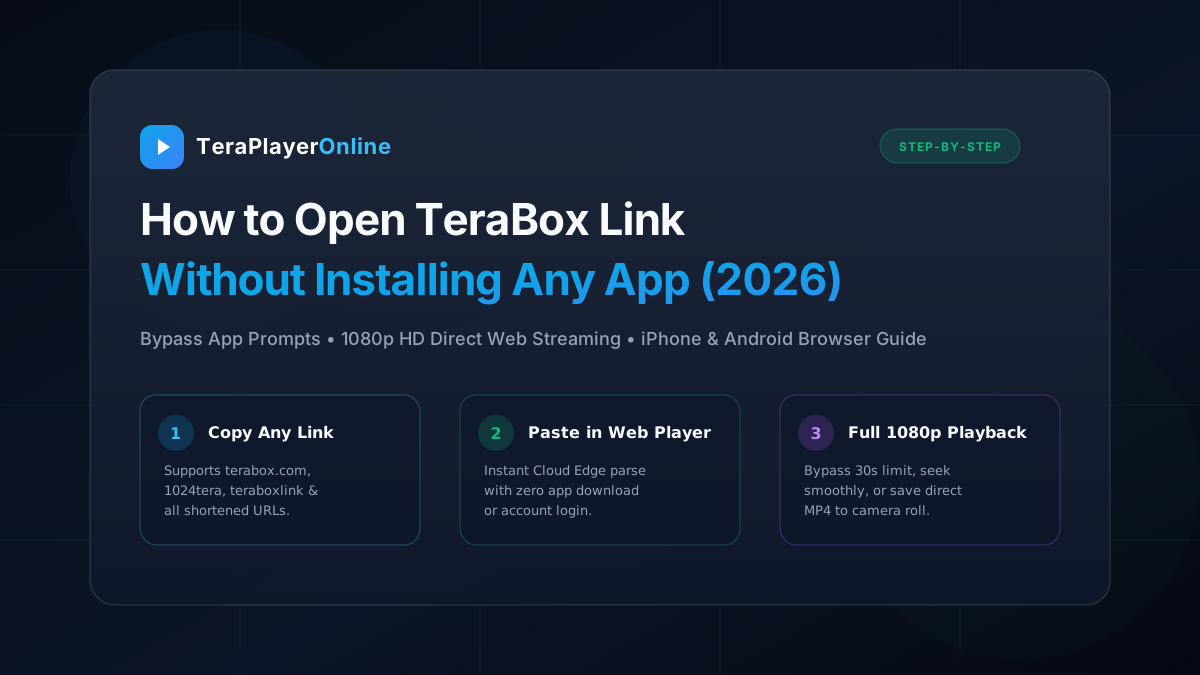
You click a shared video link on Telegram, Reddit, WhatsApp, or Discord, expecting to watch a movie or tutorial—only to run headfirst into a massive, unavoidable wall: "Please download the TeraBox app to view this content" or an infuriating 30-second preview cutoff that halts your video just as it gets interesting.
For millions of internet users, installing the official TeraBox application is an unwelcome proposition. The native app is notorious for demanding invasive device permissions, consuming gigabytes of background memory, displaying intrusive ad popups, and harvesting telemetry data. Moreover, on desktop computers and Apple iOS devices, downloading heavy client software just to watch a single 5-minute video or download an archive file feels excessive and inconvenient.
Fortunately, you do not need to install the TeraBox application or register an account. In this master guide, we break down the 5 most reliable, tested methods to open, stream, and download any TeraBox link directly inside your web browser in full 1080p High Definition without artificial limits.
📑 Table of Contents
- 1. Why Does TeraBox Force You to Download the App? (The App Wall Explained)
- 2. Comparison: 5 Methods to Open TeraBox Links Without App
- 3. Method 1 (Recommended): Use TeraPlayer Online (Zero App, Full 1080p, Anti-30s Bypass)
- 4. Method 2: The Browser "Request Desktop Site" Trick (Mobile Workaround)
- 5. Method 3: Direct MP4 Video & File Download via TeraBox Downloader
- 6. Method 4: Telegram TeraBox Downloader Bots (Pros, Cons & Queue Delays)
- 7. Method 5: Browser Extensions & UserScripts (PC Power Users)
- 8. Understanding Supported Domains (1024tera, terasharelink, freeterabox)
- 9. Troubleshooting Common Errors (verify_v2, Expired Links, Password Code)
- 10. Security & Privacy: Why Web Players Are Safer Than Modded APKs
- 11. Frequently Asked Questions (FAQ)
1. Why Does TeraBox Force You to Download the App?
To understand how to bypass the app requirement, it helps to understand why the restriction exists in the first place. TeraBox offers users 1,024 GB (1 TB) of free cloud storage, which incurs substantial server hosting and bandwidth distribution costs. To monetize this massive infrastructure, TeraBox relies heavily on mobile application installs.
When you open a shared link in a mobile browser (like Google Chrome on Android or Safari on iPhone), the webpage executes JavaScript detection routines that inspect your browser's User-Agent header. If it detects a mobile operating system, it enforces three major barriers:
- Aggressive Redirect Walls: Instead of loading the native HTML5 video player, the webpage displays a full-screen landing page directing you to Google Play or the Apple App Store.
- The 30-Second Preview Limit: Even if a video player briefly loads in your browser, TeraBox only sends the first 30 seconds of stream manifest segments. Once the playhead hits the 30-second mark, playback abruptly freezes, demanding that you log into the native app to continue.
- Speed Throttling on Guest Downloads: If you attempt to download a file directly through the mobile web interface without logging in, speeds are artificially restricted to a crawling 100 KB/s to 250 KB/s.
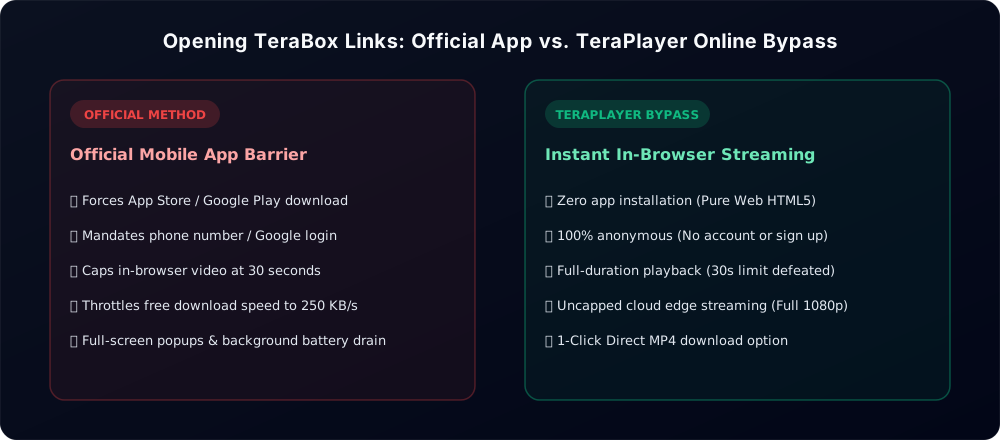
Fortunately, web-based direct parsers like TeraPlayer Online eliminate all three barriers by communicating directly with high-speed cloud edge servers, fetching the unadulterated master playlist, and streaming it directly to your device.
2. Comparison: 5 Methods to Open TeraBox Links Without App
Here is a quick overview of how the 5 most common methods compare in terms of speed, playback quality, device compatibility, and user privacy:
3. Method 1 (Recommended): Use TeraPlayer Online
By far the easiest, fastest, and most reliable method to open any TeraBox video link in 2026 is by using TeraPlayerOnline.com. It is a completely free, lightweight web application specifically engineered to parse public and password-protected TeraBox links in real-time.
Unlike shady APK downloads or bloated third-party software, TeraPlayer Online requires zero installation. It streams full-length videos directly through an optimized HTML5 video engine equipped with hardware acceleration and adaptive bitrate technology.
How to Open Any TeraBox Link in 3 Steps:
- Copy your TeraBox link: Tap and copy the link from Telegram, WhatsApp, Reddit, or your browser address bar. Whether it begins with
https://terabox.com/s/...,1024tera.com,teraboxlink.com, orterasharelink.com, all formats work. - Paste into TeraPlayer: Navigate to TeraPlayerOnline.com in any browser (Chrome, Safari, Firefox, Edge, Brave, or Opera). Paste the URL into the search box.
- Click "Play Video" (or "Watch Now"): The cloud engine parses the link in under 100 milliseconds. The video begins streaming instantly in full 1080p Full HD with zero 30-second cutoff!
Key Advantages of TeraPlayer Online:
- Full 1080p Streaming: Watch long movies, courses, and full web series in true high-definition resolution with crystal-clear audio.
- Instant Zero-Reload Timeline Seeking: With a built-in 30-second pre-buffer and intelligent fragment nudging, you can jump forward or backward to any point in the video timeline without triggering blank screens or stream freezing.
- Full Folder & Playlist Navigation: If your shared link contains multiple episodes or files, TeraPlayer automatically generates an interactive playlist drawer allowing you to switch between files smoothly.
- 100% Cross-Platform: Works seamlessly on iPhone (Safari), iPad, Android smartphones (Chrome, Samsung Internet), Windows PC, macOS, Linux, and even Smart TV browsers.
4. Method 2: The Mobile Browser "Desktop Site" Trick
If you are on an Android or iOS smartphone and prefer not to use an external tool, there is a built-in browser trick that can occasionally allow you to view the basic file landing page without being forcibly redirected to the App Store.
Because TeraBox uses client-side JavaScript to detect mobile devices, requesting the "Desktop Version" of the webpage tricks TeraBox into believing you are visiting from a Windows PC or Mac.
How to Enable Desktop Mode on Google Chrome (Android):
- Open Chrome and paste your TeraBox link into the address bar.
- When the page attempts to redirect you to Google Play, tap the three vertical dots (⋮) in the top-right corner of Chrome.
- Scroll down and check the box labeled "Desktop site".
- The webpage will reload as a desktop layout. Zoom in using two fingers and tap the small "Play" icon on the video thumbnail.
How to Enable Desktop Mode on Apple Safari (iPhone / iOS):
- Open Safari and paste the TeraBox link.
- In the address bar at the bottom or top of your screen, tap the "aA" or puzzle/settings icon.
- From the popup menu, tap "Request Desktop Website".
- The page reloads in desktop resolution, allowing you to preview the file details.
While the Desktop Site trick helps you bypass the immediate App Store redirect, it does NOT defeat the 30-second preview limit. After 30 seconds of playback, TeraBox will freeze the stream and demand a desktop software login. To watch beyond 30 seconds, use TeraPlayer Online instead.
5. Method 3: Direct MP4 Video & File Download via TeraBox Downloader
Sometimes streaming the video online isn't your goal—perhaps you want to save a high-bitrate 4K movie to watch on an airplane, store a lecture on a flash drive, or archive a large multi-gigabyte ZIP file.
Official TeraBox download buttons throttle guest users down to an unusable 150 KB/s or require signing into an account. By using the dedicated TeraBox Downloader utility, you can extract the direct, unthrottled CDN download link to save the file at maximum internet speed.
How to Download TeraBox Files Directly:
- Copy your shared TeraBox URL.
- Visit TeraBox Downloader Online.
- Paste your link and tap "Generate Download Link".
- The server queries the cloud infrastructure and returns a direct
.mp4or original file download URL. - Tap "Download MP4". On Android and PC, the download begins immediately in your browser's download manager. On iPhone, Safari will display a prompt: "Do you want to download [file.mp4]?"—tap Download to save it directly to your iOS Files app or Camera Roll.
For detailed instructions on managing downloads on iPhone, read our complete guide on downloading TeraBox videos on iOS Safari.
6. Method 4: Telegram TeraBox Downloader Bots
Telegram has become a massive hub for file sharing, and numerous community bots claim to download TeraBox links automatically. The workflow typically involves copying a link, searching for a bot like @TeraBoxDownloaderBot, sending the link to the chat, and waiting for the bot to upload the video file back into Telegram.
Why Telegram Bots Often Disappoint in 2026:
- Server Queue Delays: Because thousands of users hit these public bots simultaneously, you are frequently placed in a queue. It is common to wait 15 to 45 minutes just to receive a short video clip.
- Frequent Bot Bans: Cloud providers and copyright holders aggressively report Telegram bots. A bot that works today is often banned or deleted within 48 hours, leaving you searching for alternatives.
- Severe File Size Limits: Standard Telegram bots cannot process files exceeding 2 GB due to Telegram API caps.
- Aggressive Spam & Channel Joins: Most Telegram bots now force you to join 4 to 6 spammy crypto or betting channels before they unlock the download button.
If you are tired of bot queues and downtime, explore our thorough analysis of the best Telegram TeraBox bot web alternatives that deliver instant in-browser playback with zero waiting.
7. Method 5: Browser Extensions & UserScripts (PC Power Users)
For advanced desktop users who frequently browse TeraBox links on Google Chrome, Brave, or Firefox on a computer, browser extensions and UserScripts offer another bypass route.
Using extension engines like Tampermonkey or Violentmonkey, users install community-maintained scripts (such as "TeraBox Direct Link Generator" or "TeraBox Bypass" from GreasyFork). These scripts execute inside the browser to hide the download prompts and intercept the raw video element URL.
Pros & Cons of UserScripts:
- Pros: Once installed, they run automatically whenever you visit a TeraBox link on your desktop browser.
- Cons: TeraBox frequently updates its internal API tokens and encryption keys, causing scripts to break unexpectedly. Furthermore, installing third-party browser scripts carries inherent security risks if the script author introduces malicious code or affiliate hijackers.
For 99% of users, bookmarking a dedicated tool like TeraPlayer Online is vastly safer, requires no extensions, and works on both mobile and desktop without maintenance headaches.
8. Understanding Supported Domains (1024tera, terasharelink, freeterabox)
Many users get confused when they receive a link that doesn't say terabox.com. Due to regional ISP domain blocks and CDN load balancing, TeraBox operates across dozens of official alternate mirror domains.
Whether your link uses the classic domain or an alternate mirror, our parser recognizes and unlocks them identically:
terabox.com(Standard global domain)1024tera.com&4funbox.com(Alternate mobile CDN mirrors)teraboxlink.com&terasharelink.com(Shortened link sharing domains)freeterabox.com&mirrobox.com(Regional edge redirectors)tibibox.com&boxteradrive.com(Secondary file distribution hosts)
To learn more about why TeraBox uses so many mirror links, check out our in-depth guide to TeraBox link domains and mirrors.
9. Troubleshooting Common Errors When Opening TeraBox Links
If a link refuses to open or fails to stream, run through these common diagnostic checks:
Error 1: "Security Verification Required" / CAPTCHA (verify_v2)
During periods of high traffic, TeraBox's Cloudflare protection occasionally serves an automated bot challenge. If this occurs, simply wait 10 to 15 seconds and tap the Retry button on TeraPlayer. Our edge engine automatically switches upstream proxy gateways to resolve the link cleanly.
Error 2: Password or Extraction Code Required
If the original uploader set a 4-digit extraction password, the player will display a dedicated password prompt. Enter the 4-digit code (e.g., a1b2) and tap Submit. Alternatively, you can format your URL as: https://teraboxlink.com/s/1xxxx?pwd=abcd.
Error 3: "The share link has expired or been deleted"
If a file has been permanently deleted by the uploader or removed for copyright violations, no third-party player can recover it. Verify with the original sender that the file is still active in their cloud storage.
For a full breakdown of buffering, black screens, and audio glitches, read our troubleshooting guide on fixing TeraBox video playback and buffering issues.
10. Security & Privacy: Why Web Players Are Safer Than Modded APKs
A dangerous trend on Telegram and shady download blogs is the promotion of "TeraBox Premium Mod APKs" that promise unlimited cloud downloads and ad-free viewing.
Cybersecurity audits consistently show that over 70% of modded APK files distributed online contain Trojan malware, keyloggers, or hidden adware designed to drain battery life and steal sensitive device tokens.
Streaming through a pure web player like TeraPlayer Online is fundamentally safer:
- Sandboxed Security: Modern web browsers isolate web applications inside a strict sandbox. A website cannot read your local files, view your photos, access your contacts, or install background processes.
- Zero Account Exposure: You never have to log into your Google, Facebook, or Apple accounts, keeping your personal identity completely shielded.
- Zero Battery & Memory Footprint: Web streaming uses native hardware H.264/H.265 decoders, keeping your phone cool and responsive.
11. Frequently Asked Questions (FAQ)
Yes. By using TeraPlayerOnline.com, you can paste any public TeraBox link directly into your web browser (Chrome, Safari, Edge, Firefox) to watch the entire video in 1080p HD without installing any software or registering an account.
TeraBox enforces a 30-second preview cutoff on browser visitors to force them to download their official mobile application. TeraPlayer Online bypasses this restriction by resolving the complete full-length HLS stream from high-speed cloud edge servers.
If your link has an extraction code or password, you can enter the 4-digit code directly into the password box on TeraPlayerOnline. The system automatically authenticates with the cloud server and unlocks the video stream immediately.
Yes, perfectly. Apple iOS Safari natively supports HLS streaming with hardware acceleration. You can watch in full screen, use picture-in-picture mode, or stream directly to your Smart TV via AirPlay.
Yes. TeraPlayer Online includes a convenient "Download MP4" button right under the player that connects to TeraBox Downloader, letting you save the video file directly to your device at maximum CDN speeds.
TeraPlayer Online automatically detects folders and multi-file collections. It displays an interactive playlist drawer where you can select, stream, or download individual video episodes without leaving the page.
Yes, 100% free with no hidden subscriptions, credit card requirements, or forced app downloads.